 Billing Bazaar
How to generate an e-invoice in Vyapar
Businesses above the e-invoicing turnover limit must report B2B invoices to the Invoice Registration Portal (IRP) to get an IRN and QR code. Vyapar adds a Generate e-Invoice button to sales so you can do this from the invoice itself.
| Time needed | 2 minutes |
|---|---|
| Steps | 3, each with a screenshot |
| Tested on | Vyapar Desktop for Mac, October 2026 |
| Last updated | 11 October 2026 |
Before you start
- Your business is required to issue e-invoices and has IRP/GST portal API access set up in Vyapar.
- The customer's GSTIN on the party (e-invoicing applies to B2B sales).
1Find Generate e-Invoice on the sale
At the bottom of a sale, next to Save, is Generate e-Invoice. Use it instead of Save for B2B invoices that must be reported.

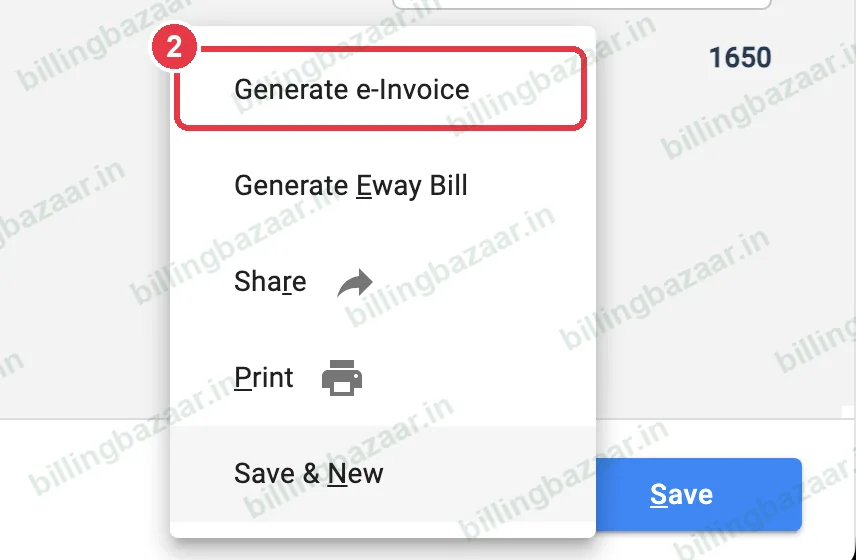
2Use the menu for related actions
The arrow beside it opens Generate e-Invoice, Generate Eway Bill, Share, Print and Save & New.
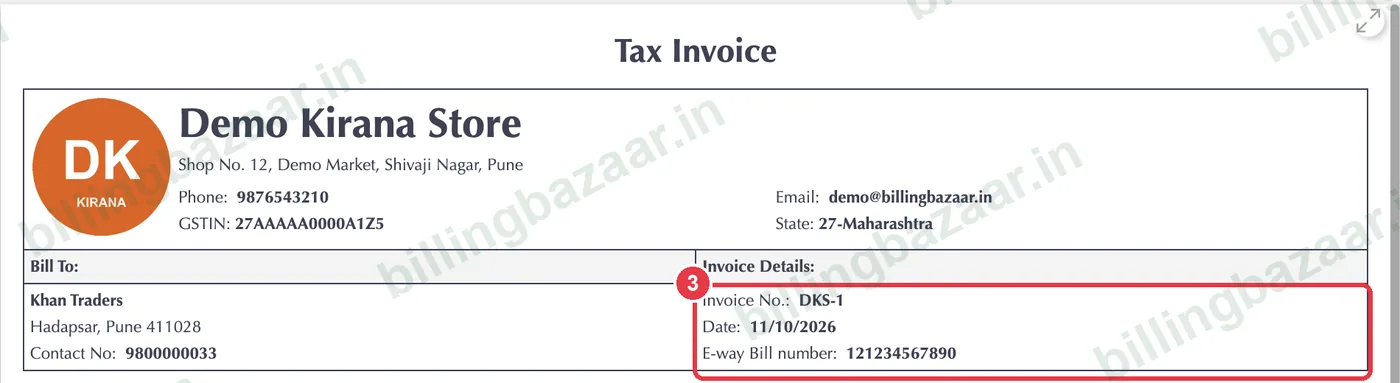
3Check the invoice details
After the IRN is generated, the invoice carries the IRN and QR code alongside the usual invoice details.
Good to know
- E-invoicing applies to B2B invoices; B2C sales need a dynamic QR instead if you are above the limit.
- Check the current e-invoicing turnover threshold with your CA.
- Cancel an e-invoice within the portal's allowed time if needed.
Questions people ask
Does Vyapar support e-invoicing?
Yes. Sales have a Generate e-Invoice option once your e-invoicing access is set up.
Who needs e-invoices?
Businesses above the government's turnover threshold must e-invoice B2B sales; check the current limit.
Can I generate e-way bill with e-invoice?
Yes. The same menu has Generate Eway Bill.
Related guides
- How to add an e-way bill number in Vyapar
- How to create a GST invoice in Vyapar
- How to generate the GSTR-1 report in Vyapar
Screenshots are from a demo company in Vyapar Desktop for Mac, October 2026. Menus can move slightly between app versions. Guide by Billing Bazaar, a Vyapar partner.