 Billing Bazaar
How to add an e-way bill number in Vyapar
Goods worth more than ₹50,000 moving by vehicle usually need an e-way bill. Vyapar can print the e-way bill number on the invoice and, on supported plans with your GST portal access set up, generate the e-way bill from the invoice.
| Time needed | 2 minutes |
|---|---|
| Steps | 4, each with a screenshot |
| Tested on | Vyapar Desktop for Mac, October 2026 |
| Last updated | 11 October 2026 |
Before you start
- An e-way bill number from the GST e-way bill portal, or e-way bill access configured in Vyapar.
1Turn on E-way bill no
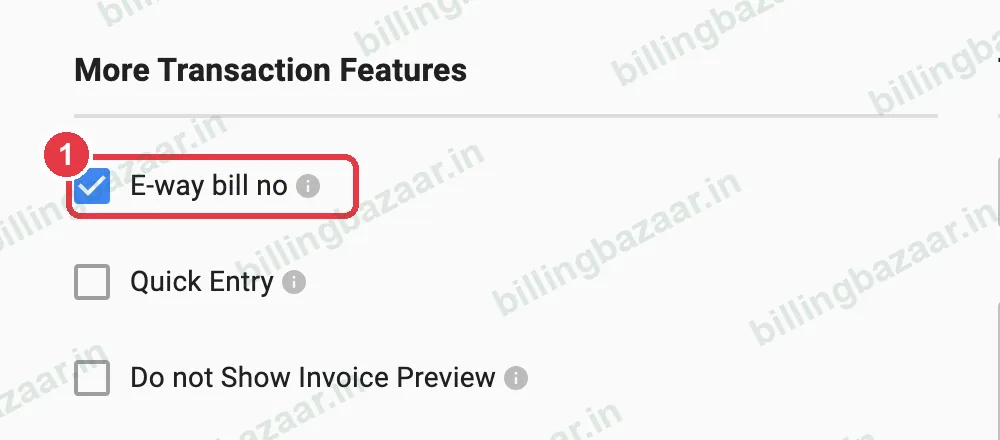
In Settings > TRANSACTION, under More Transaction Features, tick E-way bill no.
2Enter the number on the sale
An E-Way Bill No. box appears at the top of the sale invoice. Type the 12-digit e-way bill number.

3Or generate it from Vyapar
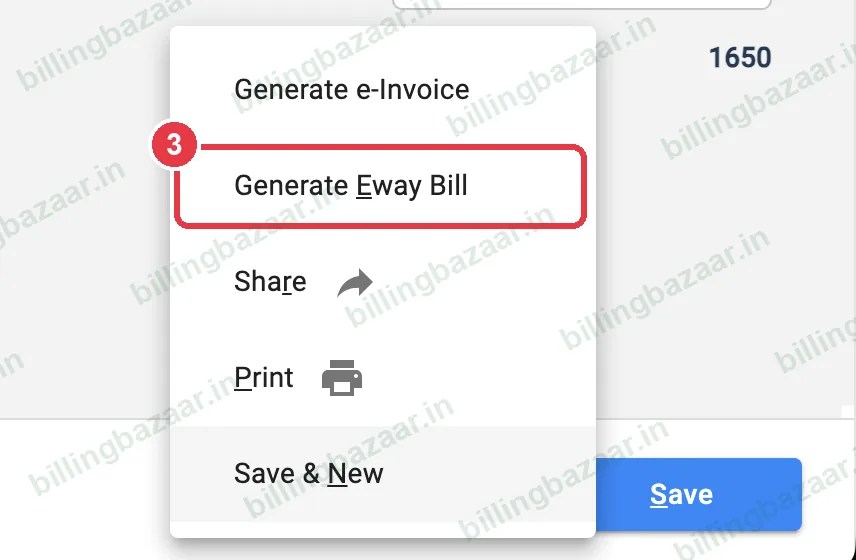
Click the arrow next to Generate e-Invoice at the bottom of the sale and choose Generate Eway Bill. This needs your e-way bill API access set up and is part of Vyapar's paid plans; Silver includes 10 a month and Gold is unlimited.
4Check the invoice
The printed invoice shows E-way Bill number under Invoice Details.

Good to know
- Generate the e-way bill before goods leave.
- Keep the vehicle number ready; it is needed for Part B.
- Check your state's limit for intra-state movement.
Questions people ask
How do I add e-way bill number in Vyapar?
Tick E-way bill no in Settings > Transaction, then type the number in the E-Way Bill No. box on the invoice.
Can Vyapar generate e-way bills?
Yes, on supported plans: use Generate Eway Bill from the menu next to Generate e-Invoice on the sale.
How many e-way bills are included?
Vyapar Silver lists 10 a month and Gold unlimited (October 2026).
Related guides
- How to generate an e-invoice in Vyapar
- How to create a delivery challan in Vyapar
- How to create a GST invoice in Vyapar
Screenshots are from a demo company in Vyapar Desktop for Mac, October 2026. Menus can move slightly between app versions. Guide by Billing Bazaar, a Vyapar partner.