 Billing Bazaar
How to set wholesale and retail prices in Vyapar
Many shops sell the same item at MRP to walk-in customers and at a lower rate to bulk buyers. Vyapar's wholesale price switches the rate automatically when the quantity on the invoice reaches the minimum you set.
| Time needed | 3 minutes |
|---|---|
| Steps | 5, each with a screenshot |
| Tested on | Vyapar Desktop for Mac, October 2026 |
| Last updated | 11 October 2026 |
Before you start
- Your retail and wholesale rates and the minimum quantity for wholesale.
1Turn on Wholesale Price
Open Settings > ITEM and tick Wholesale Price under Item Settings.

2Enter the retail sale price
In Add Item (or edit an item), enter the normal Sale Price on the Pricing tab.
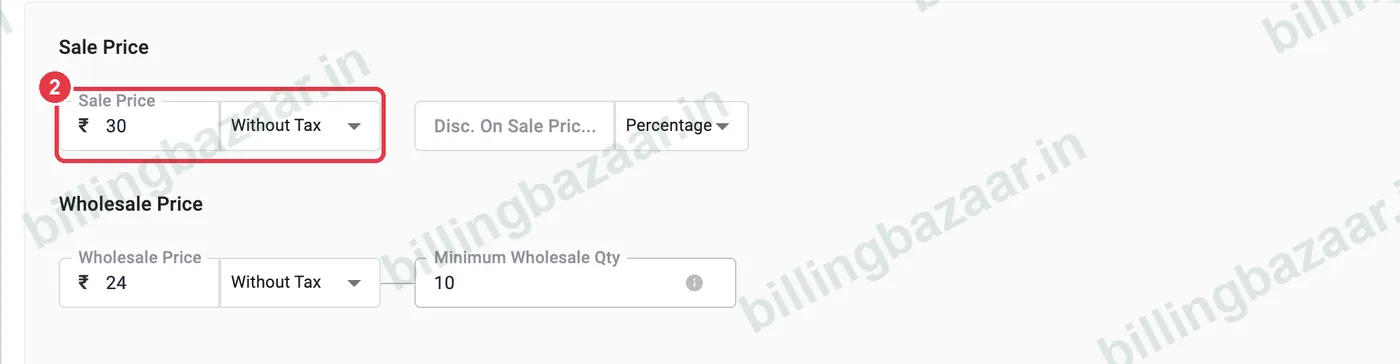
3Enter wholesale price and minimum quantity
Under Wholesale Price, enter the lower rate and the Minimum Wholesale Qty, for example 24 rupees for 10 or more. Save the item.

4Bill a bulk quantity
On a sale invoice, when the QTY reaches the minimum, Vyapar uses the wholesale rate automatically in PRICE/UNIT. Below the minimum it uses the retail price.

5Check the invoice
The printed invoice shows the wholesale rate and the tax calculated on it.
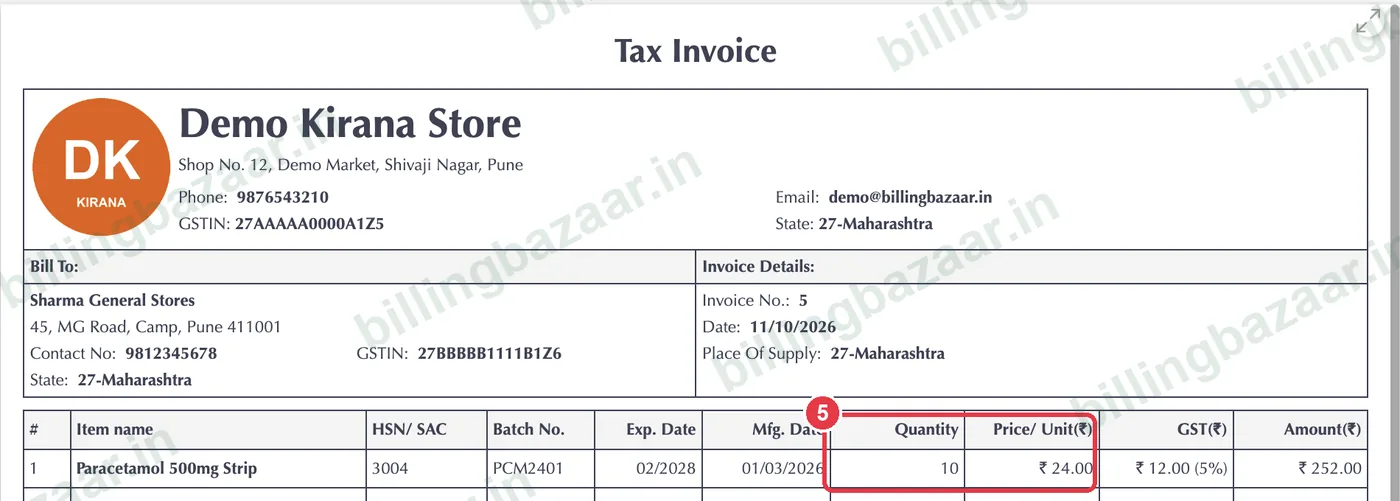
Good to know
- You can still type a different price on any invoice line.
- For a customer who always gets a special rate regardless of quantity, use party-wise item rates instead.
- Wholesale prices can be With Tax or Without Tax, like the sale price.
Questions people ask
How do I add a wholesale price in Vyapar?
Tick Wholesale Price in Settings > Item, then enter the wholesale price and minimum quantity on the item's Pricing tab.
Does Vyapar apply the wholesale price automatically?
Yes. When the invoice quantity reaches the minimum wholesale quantity, the wholesale rate is used.
Can I have both MRP and wholesale price?
Yes. The sale price is used for small quantities and the wholesale price for bulk quantities.
Related guides
- How to add items with HSN code and GST rate in Vyapar
- How to set party-wise item rates in Vyapar
- How to give item and invoice discounts in Vyapar
Screenshots are from a demo company in Vyapar Desktop for Mac, October 2026. Menus can move slightly between app versions. Guide by Billing Bazaar, a Vyapar partner.