 Billing Bazaar
How to add items with HSN code and GST rate in Vyapar
Every item you sell needs to be set up once in Vyapar: name, HSN code, unit, prices and GST rate. After that, billing is just picking the item. This guide adds a product (a bathing soap for a kirana store) in the Vyapar desktop app.
| Time needed | 3 minutes |
|---|---|
| Steps | 8, each with a screenshot |
| Tested on | Vyapar Desktop for Mac, October 2026 |
| Last updated | 11 October 2026 |
Before you start
- The item's HSN code (on your purchase bill, or search the GST portal's HSN list).
- The GST rate that applies to that HSN code.
- Your selling price, purchase price and how many you have in stock today.
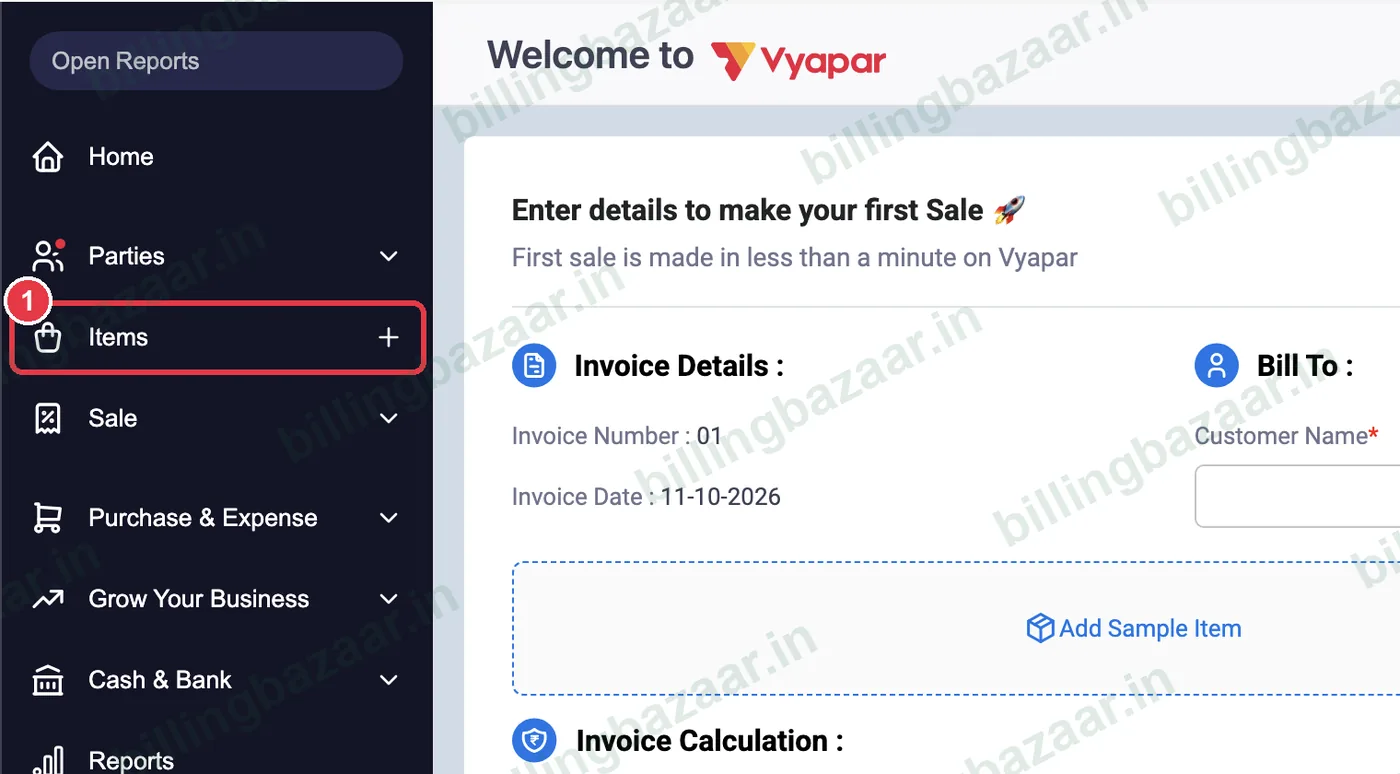
1Click + next to Items
In the left sidebar, click the + next to Items. The Add Item window opens. Keep the toggle on Product (switch to Service for services).
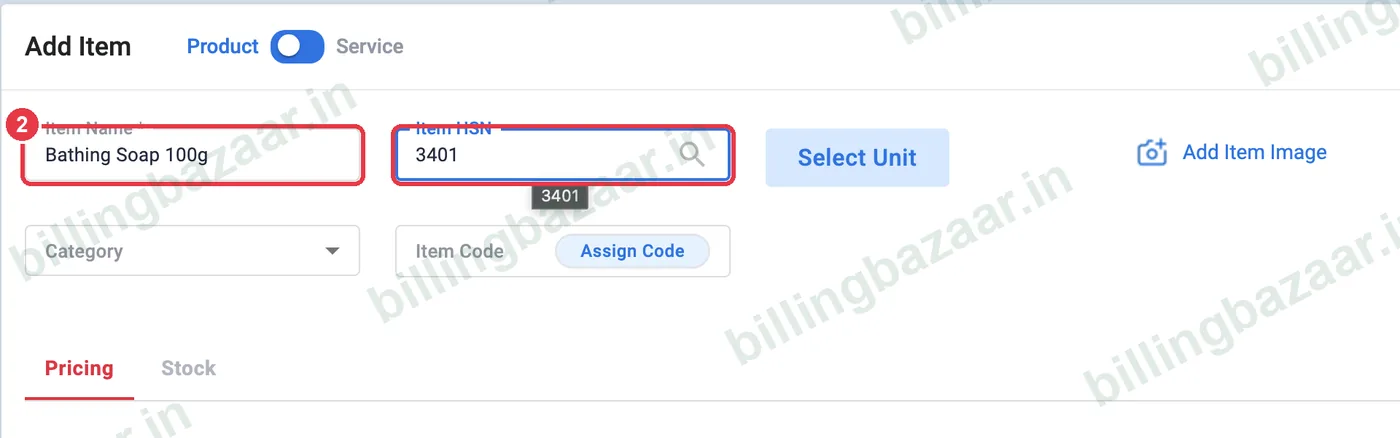
2Enter the item name and HSN code
Type the Item Name as it should appear on bills (for example Bathing Soap 100g). In Item HSN, type the HSN code (3401 for soap). You can also click the search icon to find an HSN code by product name.
Tip: Include size or weight in the name (100g, 1kg) so staff pick the right item while billing.
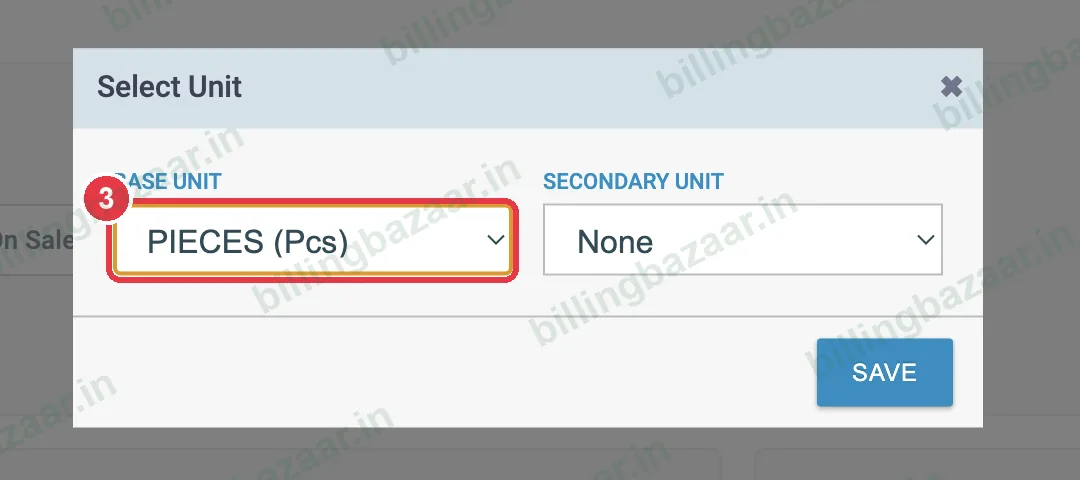
3Select the unit
Click Select Unit, choose the Base Unit you sell in (here PIECES (Pcs)) and click SAVE. Use the Secondary Unit if you also buy or sell in boxes or cartons.
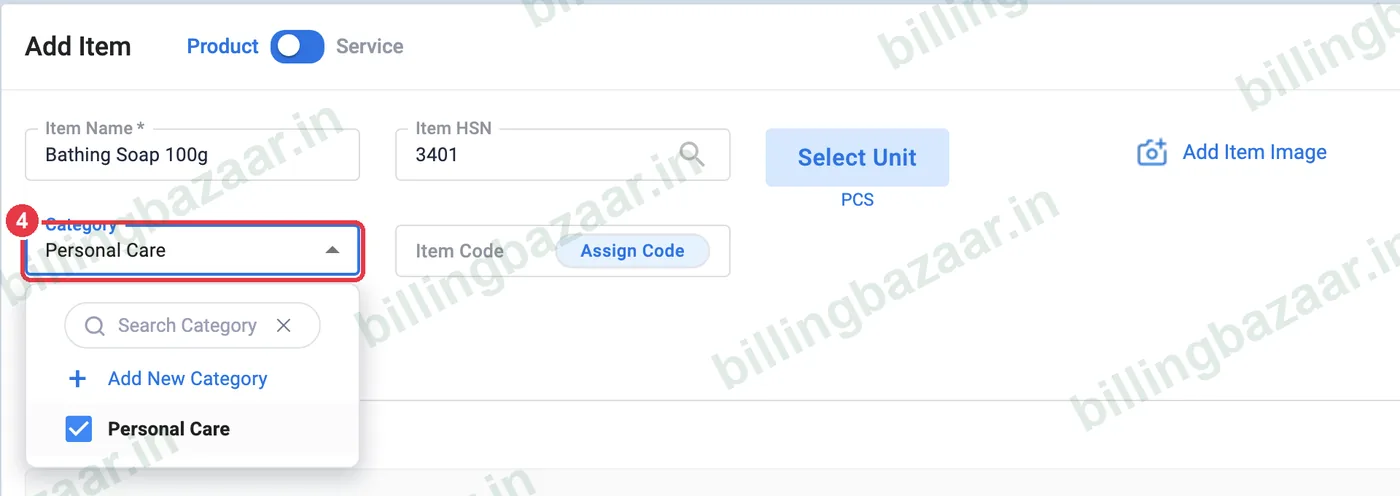
4Choose or create a category
Open Category. If the category does not exist yet, click Add New Category, type a name (for example Personal Care) and click Create. Categories make the item list and reports easier to filter.
5Enter sale and purchase prices
On the Pricing tab, enter the Sale Price and Purchase Price. Next to each, choose Without Tax if the price excludes GST, or With Tax if it already includes GST (common for MRP items).
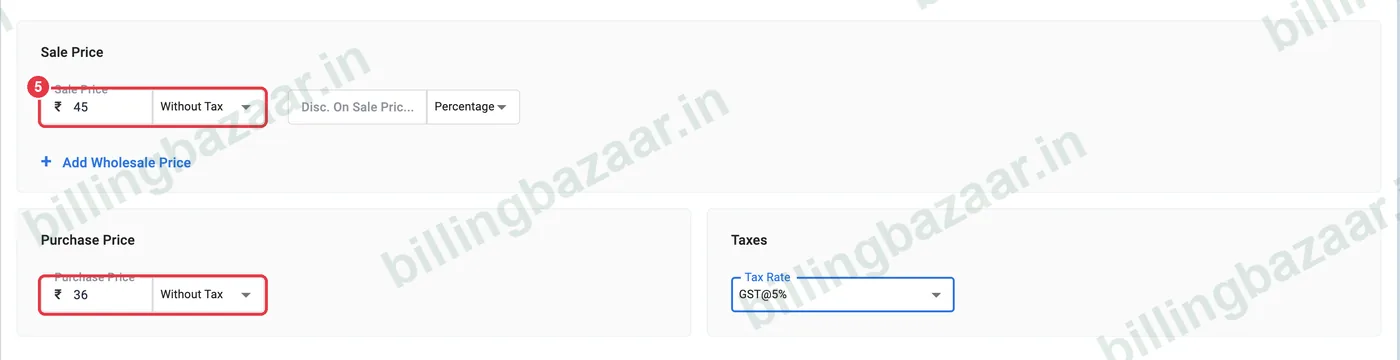
Tip: If you sell at MRP, set the sale price to With Tax so the bill total equals the MRP.
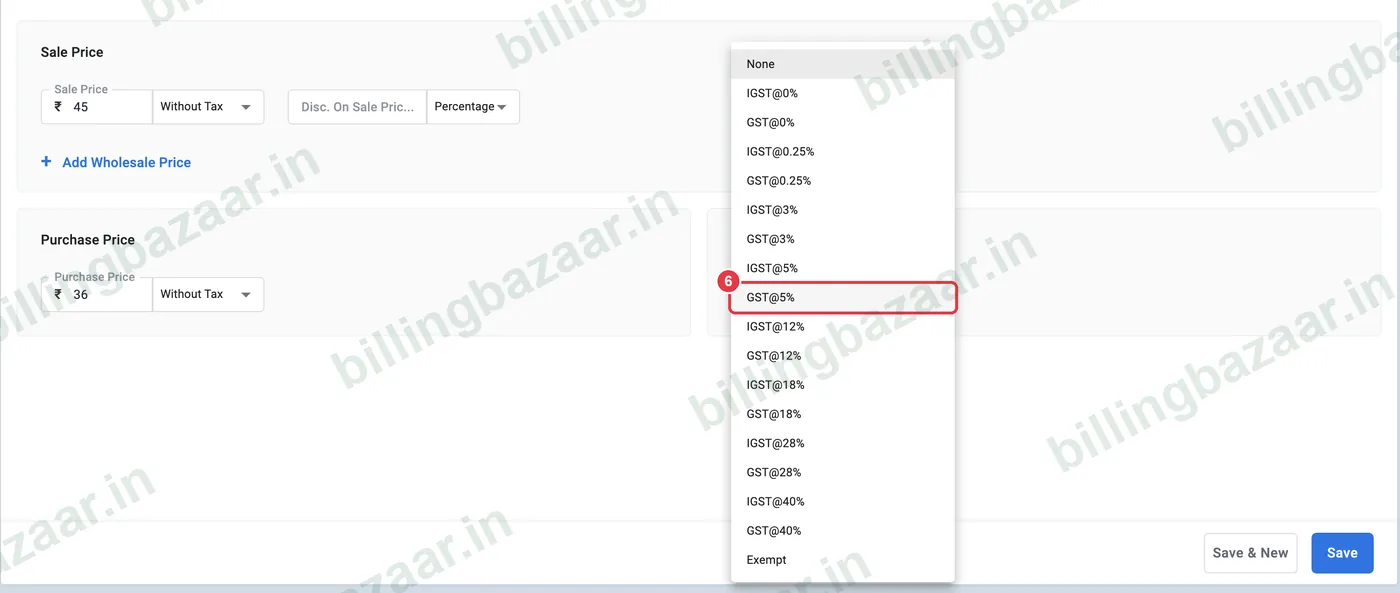
6Pick the GST rate
Under Taxes, open Tax Rate and choose the rate for the HSN code. Pick the GST@ option: Vyapar automatically charges IGST at the same rate when you sell to a customer in another state.
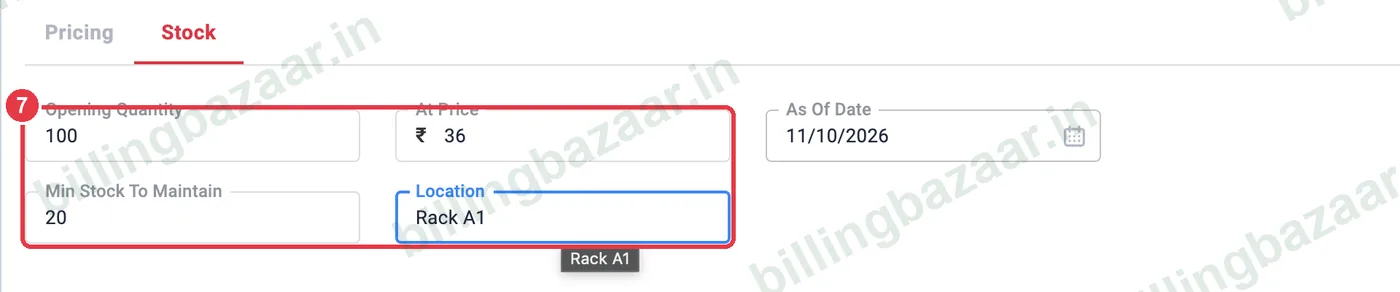
7Add opening stock
Open the Stock tab. Enter the Opening Quantity you have today, the cost At Price, and the As Of Date. Add Min Stock To Maintain to get low-stock alerts, and a shelf Location if you like.
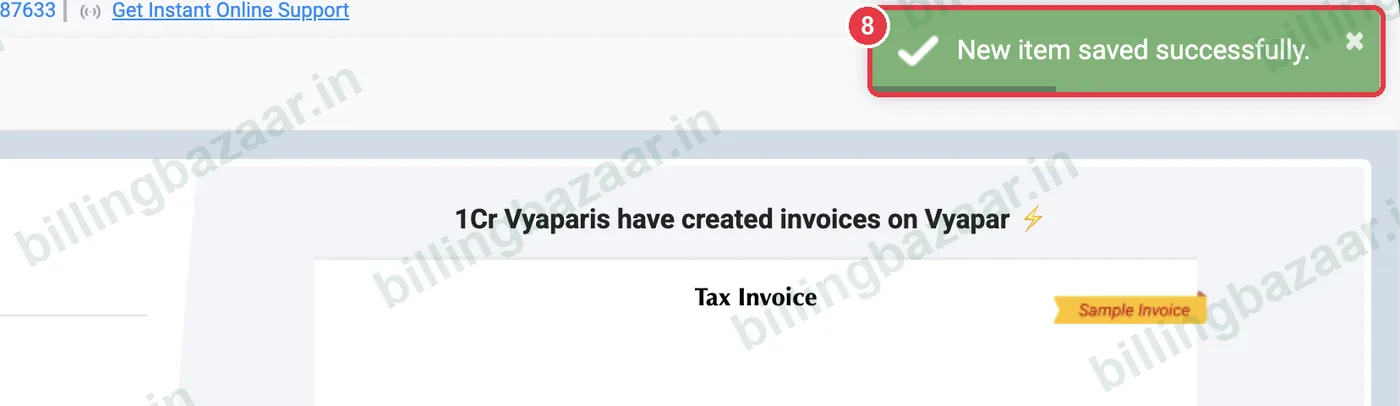
8Click Save
Click Save (or Save & New to add the next item straight away). Vyapar shows New item saved successfully, and the item is ready to use on invoices.
Good to know
- Add many items at once with Import Items from Excel instead of one by one.
- Use Assign Code to give each item a barcode or SKU for faster billing.
- Add Wholesale Price lets you keep a second rate for bulk buyers.
- GST rates change from time to time; check the current rate for your HSN code on the GST portal.
Questions people ask
How do I add HSN code in Vyapar?
In Add Item, type the code in the Item HSN field, or click the search icon in that field to look it up by product name.
What does With Tax and Without Tax mean on the price?
With Tax means the price you enter already includes GST; Without Tax means GST is added on top when you bill.
Why is there GST and IGST in the tax list?
Choose GST for the item. Vyapar charges CGST + SGST for customers in your state and switches to IGST automatically for customers in other states.
Is opening stock compulsory?
No, but adding it means your stock report is correct from day one and low-stock alerts work.
Can I edit an item later?
Yes. Open Items, select the item and edit any field, including the price and tax rate.
Related guides
- How to import items from Excel in Vyapar
- How to set units and unit conversion in Vyapar
- How to set wholesale and retail prices in Vyapar
- How to set low stock alerts in Vyapar
- How to create a GST invoice in Vyapar
Screenshots are from a demo company in Vyapar Desktop for Mac, October 2026. Menus can move slightly between app versions. Guide by Billing Bazaar, a Vyapar partner.